You can get premium WordPress plugins right now! Please visit the DOWNLOAD page for more information and a full list of available WordPress plugins.
"I cannot explain how happy I am with the work carried out by BestWebSoft. The communication was second to none and everything I asked for was supplied in great time. Highly recommend!"
Darren Pratt | 76design

* Actions: Add the Follow button the easiest way.
* Actions: Add Facebook Like button easily.
* Display: Select the button position: before the content, after, before and after or using a shortcode.
* Display: Use a standard image or replace it with some other image.
* Arabic (ar_AR) (thanks to Albayan Design Hani Aladoli)
* Hebrew (he_IL) (thanks to Sagive SEO)
* Persian (fa_IR) (thanks to Einolah Kiamehr)
* Russian (ru_RU)
* Serbian (sr_RS) (thanks to Georgijevic Team, www.georgijevic.info)
* Spanish (es_ES) (thanks to Jesús Parra)
* Turkish (tr_TR) (thanks to Can Atasever, www.candanblog.com)
* Ukrainian (uk) (thanks to Cmd Soft, www.cmd-soft.com)
If you create your own language pack or update the existing one, you can send the text in PO and MO files for BWS and we'll add it to the plugin. You can download the latest version of the program for work with PO and MO files Poedit.
facebook-button-plugin to the directory /wp-content/plugins/.In WordPress admin panel go to "Plugins", find "Facebook Button Plugin" and click "Activate".
In WordPress admin panel go to "Plugins", find the Facebook Button Plugin and click "Deactivate".
In WordPress admin panel go to "Settings", find the Facebook Button Plugin settings page and enter your Facebook login. Then click "Update Changes".
If you do not have Facebook account yet, you should create it using this link: http://www.facebook.com . After the account is created please follow the instructions above.
In WordPress admin panel go to "Settings", find the Facebook Button Plugin settings page and choose one of the listed positions: Before, After, Before and After or Shortcode. Then click "Update Changes".
In WordPress admin panel go to "Settings", find the Facebook Button Plugin settings page and choose one of the listed positions: Standard Facebook image or Custom Facebook image. Then click "Update Changes".
If you choose Custom Facebook image, you can upload your own picture. You should click "Choose file" and choose an image in your folder. Then click "Update Changes".
You should click "Update Changes". Make sure that you got the message "Options Saved".
After saving your settings you should refresh your web page where the Facebook Button icon should be placed.

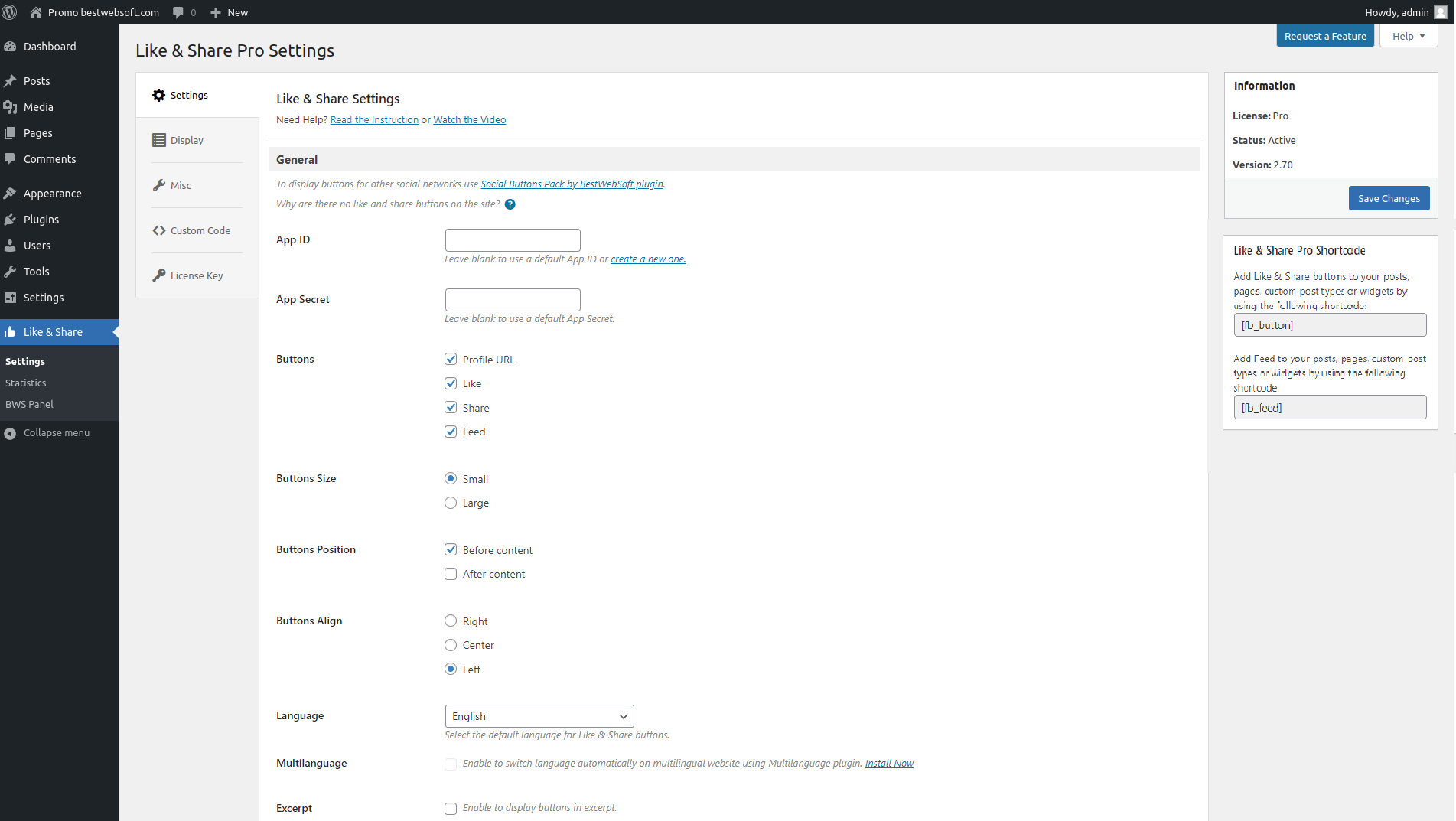
Plugin admin page.

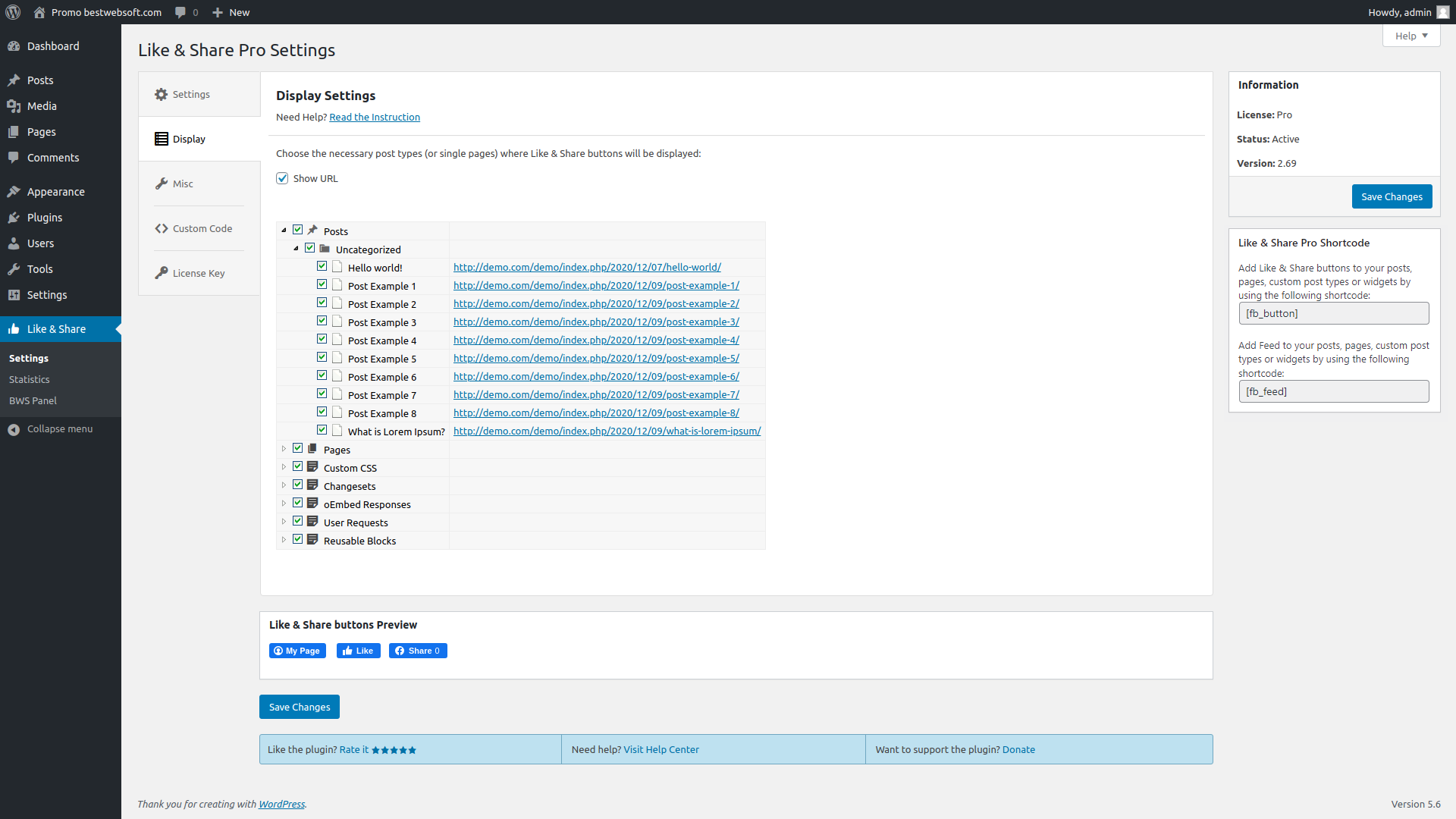
Plugin admin page: select display option.

Plugin admin page: select Facebook Button position.

Displaying Facebook Button in your post via the shortcode.

Displaying Facebook Button ater your post.
* Bugfix : The error related to creation the path to the Facebook button image is fixed.
* Update : BWS plugins section is updated.
* NEW : The English language is updated in the plugin.
* Bugfix : The bug of displaying icons in the admin menu is fixed.
* NEW : The Ukrainian language file is added to the plugin.
* Update : We updated CSS file.
* Update : We updated all functionality for wordpress 3.5.1.
* NEW : The Persian and Serbian language files are added to the plugin.
* Update : We updated all functionality for wordpress 3.5.
* NEW : The Arabic language file is added to the plugin.
* Bugfix : Cross Site Request Forgery bug is fixed.
* NEW : The Hebrew language file is added to the plugin.
* Update : We updated all functionality for wordpress 3.4.1.
* Bugfix : The bug with saved 'sortcode option is fixed.
* NEW : A possibility to change language for Like button.
* Update : We updated all functionality for wordpress 3.4.
* NEW : A possibility to turn off the display of the buttons.
* NEW : The Turkish language file is added to the plugin.
* Bugfix : The bug with upload custom image for button is fixed.
* Changed : BWS plugins section.
* NEW : The Spanish language file is added to the plugin.
* Change : Code that is used to connect styles and scripts is added to the plugin for correct SSL verification.
* Changed : BWS plugins section.
* NEW : Language files are added to the plugin.
* NEW : Style for facebook button block is added.
* Bugfix : Redirect to profile page bug is fixed.
* Bugfix : BWS Plugin's menu section was fixed and right now it is consisted of 3 parts: activated, installed and recommended plugins.
* Bugfix : The bug of positioning in admin menu is fixed.
* Changed : Facebook button plugin functionality was changed in connection with the change of Facebook API.
* Changed : BWS Plugin's menu sections was fixed and right now it is consisted of 2 parts: installed and recommended plugins.
* Bugfix : Displaying of the icons is fixed.
* The bug with the link to the settings page is fixed in this version.
* Usability at the settings page of the plugin was improved.
* Ability to install Facebook Button icon with a link to the account page, including settings adjustment functionality via WordPress admin panel.
Hi there, I know this is probably a common question, but I couldn´t find the answer. I added this like button on my page and its working, but – is there a possibility how to see who actually clicked on that button?
thank you!
1) You can’t know who liked it, but you can know count
http://Graph.facebook.com/?id=http://stackoverflow.com
change http://stackoverflow.com with liked site
2)Copy your post link from the address bar.
Go to http://developers.facebook.com/docs/reference/plugins/like/
Paste your link in “URL to like” text box.
Click preview.
You will see the name + photo of your facebook friend in the right side (Yes, you can see only 2 to 3 friends).
If a person liked your post and not your facebook friend, you can’t find him
Hi Team,
is it possible to see the facebook-user who “like” at my page? Just see that there was a like, nothing more…
regards
Sebastian
You can’t know who liked it, but you can know count
http://Graph.facebook.com/?id=http://stackoverflow.com
change http://stackoverflow.com with liked site
Copy your post link from the address bar.
Go to http://developers.facebook.com/docs/reference/plugins/like/
Paste your link in “URL to like” text box.
Click preview.
You will see the name + photo of your facebook friend in the right side (Yes, you can see only 2 to 3 friends).
If a person liked your post and not your facebook friend, you can’t find him
Hi!
I’d like to add the “like” button into my header. How do I do that without putting a shortcode in my page? Thank you.
You can add string below to the ‘header.php’ file:
line
< ?php if(function_exists('fcbk_bttn_plgn_shortcode')) echo fcbk_bttn_plgn_shortcode(''); ?>This is a call option which is responsible for shortcode work.
Hi,
How can I prevent your plugin from displaying on the home page of my web site? My home page is a static WP page. Also, is it possible to display this only on Posts and not Pages?
Thank you!
You can insert using a shortcode in the content of the page.
Unfortunately, not.
Hello,
I have two issues about the plugin:
The first one, is when the site is RTL (like in Hebrew), the like button rendered incorrectly (it has wrong alignment). Changing from float:left to float:right fixes the problem, but it still an issue in multisite wordpress site – when one site is in Hebrew (RTL) and the second one in English (LTR) – since the CSS is the same, one of them will be displayed wrong.
The second issue more critical for me right now: when someone “likes” my post, incorrect picture displayed near the link on the facebook. How I can control which picture is displayed? Ideally I would like the same behavior as “Link to facebook” – take thumbnail picture of the post, or the first picture if not located.
Thank you.
In oder to add necessary images for ‘like’ button, please follow the link below:
http://developers.facebook.com/docs/reference/plugins/like/
‘Step 2 – Get Open Graph Tags и Open Graph Tags’
Regarding floating, it is necessary to create for each language an unique classes and align the button concordantly these classes.
When using Chrome, I click the Like button and the drop down dialog box only shows the left portion of the comments box pops up when you attempt to like a page. Here is a screenshot of what I’m talking about. It works in all other browsers. Just not in Chrome. I have the latest version of Chrome, too.
http://www.chaparralpto.com/wp-content/uploads/2012/08/chrome_like_problem.png
Most likely that the styles of your theme is affecting to the ‘like button’ form styles.
1) Make a test: try to use another theme in order to check if this error will appear again.
2) It is possible that you need to change your theme styles in order to avoid underlaping ‘like button’ styles.
I also have the same problem as Dan Sherman, it only shows a portion of the comment. What do you mean with “change the theme styles”?
Hello Shere,
Please provide the page URL, so that we could see the problem.
What do you mean with “change the theme styles”? – it means that you should make changes (add strings) in the style.css file in your theme.
Kind regards
I like it
Thank you a lot
Hi,
How can I provide a language for shortcode [fb_button] ?
The only way is change the string where script connects for the button in the plugin. Instead of:
http://connect.facebook.net/en_US/all.jIt is necessary to write required language and in any place in the plugin where current string is located.
Will the icon eventually display existing page likes? Thanks!
The ‘Like’ button is displaying the quantity of existing likes.
Hi,
I’ve installed the plugin, and it works fine!
Just i’ve a small problem, i’m using a fix homepage of the theme, and the facebook buton is displayed on my Slider! and isn’t look great!
How can we add an exception because it’s ok on the rest of the site, but i don’t wanna see it on the Slide! :/
Thank you and good job!
I’ve used on my homepage (slide.php) this code:
function cacheId(baliseId){
if (document.getElementById && document.getElementById(baliseId) != null)
{
document.getElementById(baliseId).style.visibility='hidden';
document.getElementById(baliseId).style.display='none';
}
}
cacheId('fcbk_share');
How can i change the image as explained in the FAQ’s.. the following instructions just aren’t working..
How to change Facebook Button icon picture
In WordPress admin panel go to “Settings”, find “Facebook Button” plugin’s settings page and choose one from listed positions: Standart FaceBook image or Custom FaceBook image. Then press “Update Changes” button.
If you choose Custom FaceBook image, you can upload your own picture. To make an upload you must press “Choose file” button and choose your image from to you folder. Then press “Update Changes” button.
Hello,
Everything should work, may be script does not have enough rights to upload images. Please provide access to the admin panel in order to examine this issue and give recommendations.
I am trying to see how it shares to Facebook when you click like as I cannot see this – can anyone help? Or is this feature not working?
Hello Tristan,
This feature is present and it works if FB scripts works correctly, this does not relate to the plugin.
how do i center facebook like button counter?
Hello Roberto,
Since facebook like button counter is the iframe, so, we are not able to affect the centering of elements of the counter.
Hello,
I’ve just installed this plugin but after many tests, it seems that nothing appears on FB when someone likes one of my posts, even by cliking on “post to facebook”.
Do you have an idea of the reason why?
Thank you.
Hello Sonia,
We tested it on several websites and everything works correctly but the problem is present on your website – for unknown reason nothing appears on Facebook.
Wrong counting. I got several post and all of them have the same “like” count.
Hello Mario,
Please provide URL of the page where the button Like is and we will analyze the problem.
Love the plugin! Great work – very easy to install!
I’m having an issue with the Like Count Number. For some reason it’s saying 0 likes, even though there’s 250 likes on the page (http://www.omahabarbell.com).. Does it start over with it’s own count from the website directly and not pull what facebook says is the actual like nubmer?
I verified the Facebook ID is correct, and it links correctly too.
Any thoughts?
Hello Conor,
Could you please explain where you got 250?
hi,
i installed facebook like button on my website but there’s a problem: when i click on the “ilike” button the plugin let me share the article on my fb profile BUT it display a wrong article’s image and, in particular, the image that is linked to the previous article. what can i do!?
Hello Angelo,
It is unknown why the Facebook takes the photo is not from the post.
But here is what you can do:
http://developers.facebook.com/docs/reference/plugins/like/ section
Open Graph Tags
You can influence the content of the like window, with help by adding in header these tags.
Kind regards.
Hi,
I can click “I like” But the image is not on facebook.
Can you help me
Thank you
Hello,
Please describe in more details, what is your problem, because I can’t understand exactly how can I help you.
Waiting for your reply.
This is such an elegantly simple plugin, thanks for the work!
question: I know there is a shortcode to show the like button, however is there a shortcode to hide it? I would like to have this button on the majority of my site’s posts/pages, but hide it from a few. Instead of having to add the shortcode on the many posts, it would be great to show it on all posts as the default but be able to use a shortcode to hide it when necessary. Thanks.
Hello John,
At this moment we don’t have this kind of functional, but we will keep in mind it in the future update. If you want we can customize it for you, but it is separate payment $15.
Please don’t hesitate to ask any questions.
Kind regards
I have installed the plugin and inserted my business URL for FB. However, when I click on the button, it says that my page is not found. What am I doing wrong? Thanks!
Allison
Hello Allison,
We need the URL of your Facebook page, that we can give you correct answer.
Waiting for your reply.
I am encountering two issues which I hope you can help me with.
(1) When I view a blog post (such as http://ericscottmiller.com/2011/12/15/wheldon-killed-from-non-survivable-injuries/), there is a massive amount of space before the initial Facebook like button. I have tested this on multiple browsers with the same result. The bottom button does not have this problem. Any ideas?
(2) I have clicked on the Like button from multiple development Facebook accounts and yet my count remains at zero. I have updated the plug-in settings and received confirmation that they were saved.
Thanks,
Eric
Hello Eric,
Regarding your questions:
1) At this moment we can’t see our button at the site – we can’t help you now, because we can’t see what is wrong exactly.
2) Please write in more details what is wrong. Provide more information.
Waiting for your reply.
When I use your plugin, in facebook page of a test user I can see correctly my original post, but, after, I find “Negozio discount” 4 times … what is? Is Your that adds this automatically ? thank’s for response.
Hello Gerry
We can’t understand exactly the connection between the “like” button and “Negozio discount” 4 times at your Facebook page.
Please provide more information.
Kind regards
Dear Receiver,
I wanted to know whether i could set the counter of the number of facebook likes after installing your plugin.
Thanks
Hello Nada,
Regarding your question:
Nowhere. This information always load dynamically from Facebook.
Kind regards
Hi! Great plugins – thanks! I’m using gallery and the FB button. I have a slight problem though. On pages where the galleries are the FB button appears twice when set to before position. When set on before and after positioning it appears even three times before the gallery and once after. On the other pages and posts the button works just fine. Any suggestion?
Thanks and keep up the good work!
Regarding your question:
Because the hook calls the several times.
We need the gallery page URL, where are the several Facebook buttons.
Waiting for your reply.
Hello bestwebsoft,
i have installed WordPress as a Multisite Network.
with full Domains for 3 Sites (Not Subdomains)
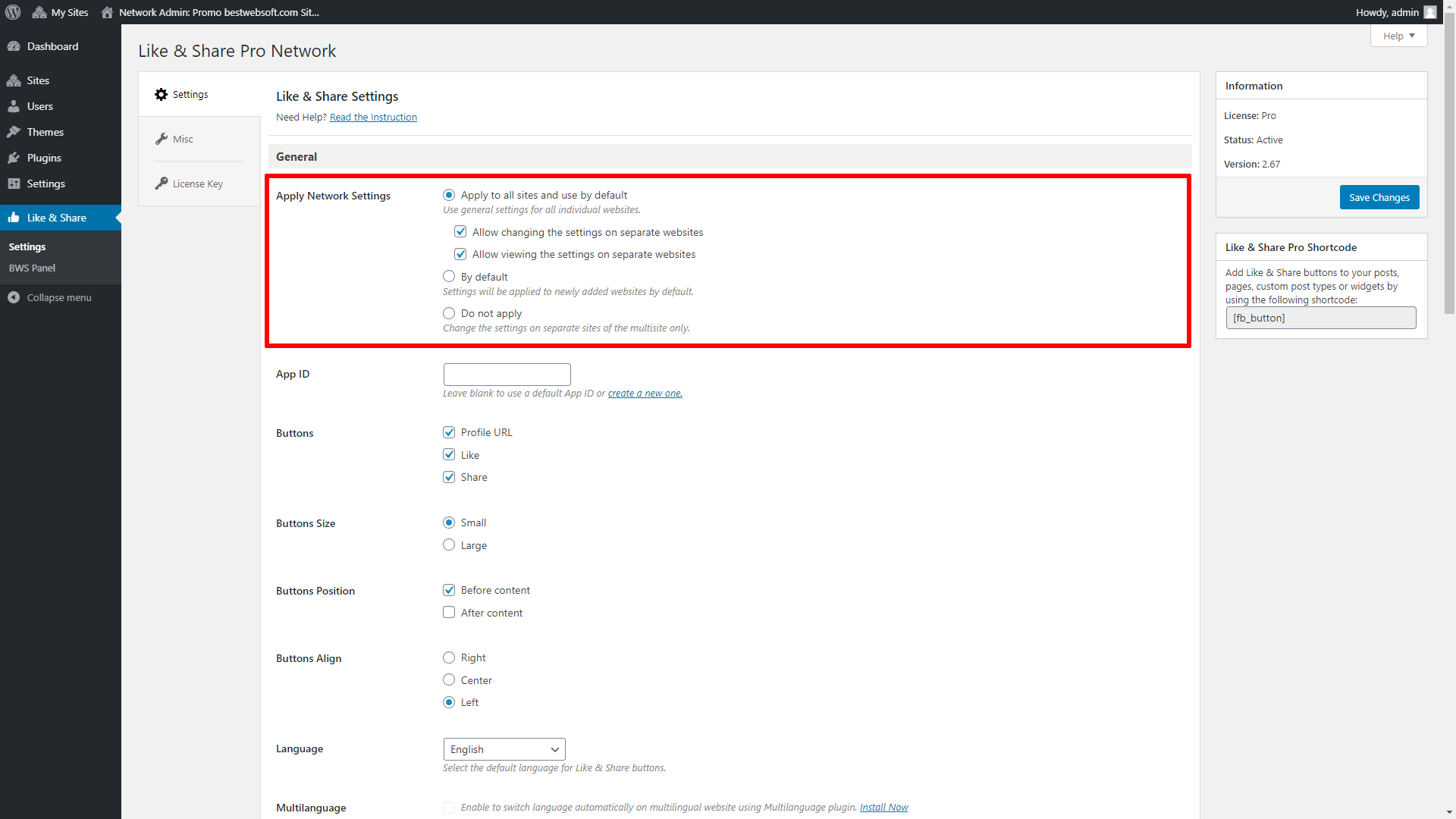
Where can i setup your plugin that it works in all Sites?
In the plugin overview in each Site i can activate all plugins which i want to use on one site.
But your Facebook Like Plugin is only shown in the Network-Plugin overview.
Please answer me.
Thank you very much
Hello Steffen,
You can activate every plugin in the Network-Plugin overview and then it will be active on the all subsites. Or you can activate each plugin separately on the every site.
Our plugin allows to make it too.
But if you activate the plugin as Network-Plugin overview, then it will not be visible in the list of plugins on the each site.
Kind regards
Hello:
I want to make the plugin run on a https website.
I have tried modifying the facebook-button-plugin.php file adding https instead of http.
(so both links http://connect.facebook.net get into https://connect.facebook.net)
It seems to work and makes plugin secure, but console reports an error.
Any idea/help?
Thanks in advance
Hello,
Not all the scripts can connected https connection. As we know, the some google scripts can not be connected. Perhaps, the same situation with Facebook scripts.
Kind regards
I installed the plugin, but it doesn’t work. What kind of facebook Id is requested in the settings ? Is my facebook Id my name ?
Dear Ben,
You should write the word Nanoties in the filed Your’s FaceBook Id.
Kind regards
Dear,
It seems that your plugin keeps reloading with every blog post once, making Chrome very unresponsive during that period (around 30 seconds on a longer blog). On other browsers (IE for example) it just creates annoying flashing motion that looks unprofessional and is very distracting.
Could this be fixed? Other buttons do not show this behaviour in blog posts.
Hello Michael,
Unfortunately, we did the test and found, that the button appears only when the script call is placed near with button. This is causes the error. But the button won’t work in another way – any button on the page can’t work and does not even show up if the script is called in the header or footer.
But now we can’t see no options of changing the plugin work. Perhaps, we will fix this problem with Facebook API changes.
Kind regards
hi i am using a shortcode mode for my fb “like” to show under post tho in WP post editor i am placing it in the middle of the side ( centering the shortcode ) and it’s centered in editor tho on page it’s moving lefft – how to center it on page ?
Hello,
Please provide the page URL with the button in the frontend, so that we can give you recommendations.
Looking forward to your reply.
I have installed your gallery & facebook plugin. I get a double facebook like on the gallery page when use the shortcode for a single gallery. How can i remove the facebook feature from the gallery page?
Hello Donnell,
We can do plugin customization for your needs. But it is a paid service.
Kind regards,
the page with your plugin is
http://www.galbc.org/home/calendar/gallery/
It is not working properly. The MYPAGE button appears but it is simply a link to my facebook fan page. I want that people immediately by clicking on your thumb. Furthermore the count is zero and doesnt represent the amount of likes
Hello Richard,
The MYPAGE button appears but it is simply a link to my facebook fan page – it should be like this, it is the button, which leads to your Facebook page.
I want that people immediately by clicking on your thumb. Furthermore the count is zero and doesnt represent the amount of likes – the button “like” is exist for it – the button is present in the plugin, please activate it in the plugin settings.
Kind regards
The like button seems to work fine, however when I load my front page it causes it to refresh several times before all of the like buttons are loaded and forcing you to wait for several seconds before you can actually read anything on the site.
Is this just how this plugin was designed or is there something I can do to prevent the constant refreshing?
Hello Spenser,
Unfortunately, when using the like button, the code of each button has the script connection of Facebook, that’s why appears causes it to refresh several times before all of the like buttons are loaded. We can’t help you with this.
Kind regards
Hello,
Thanks for this plugin.
I have placed it on my contact page with a shortcode.
Is there a way to have only the homepage of the site that is taken into consideration (meaning each time somebody clicks on the FB button, the home page site is shared and not the current page where the button is).
Many thanks
Pat
Hello Pat,
Please send us an example of page with button, so that we could check what is wrong.
Kind regards
How can I get the facebook like button to go right instead of left?
Hello Mikaela,
It is impossible to entirely display it on the right, because when you click to like button appears the block, which also will move.
If it is suitable for you, you can write these string in the style.css in your theme:
#fcbk_share {
margin-left: 420px;
}
420px – it is a indent from the current buttons location (you can change it for necessary value)
Kind regards
I’m using the shortcode and having a couple of issues:
1) Here is a jpg of a Facebook post generated from the “Like” button http://www.jkfavero.com/like.jpg showing tags and other words that are being hidden in the blog post on the website. Is there a way to not show these?
2) Here is a link to the blog post itself: http://www.jeffreyfavero.com/ogden-poster-print/ The thumbnail image is not from the post either. How do I insure that the correct post image shows as a thumbnail on Facebook?
Thanks, Jeff
Hello Jeff,
You can find information regarding it on the block step 2. Please go to this link https://developers.facebook.com/docs/reference/plugins/like/
Kind regards
after I install this plug in and go to my site and hit the facbook icon it goes to a message that says the link is broken how do i fix this?
thanks
Hello Debbie,
Please provide a page URL with button, so that we can see the problem.
Kind regards
Hey guys! I love how the twitter plug-in puts a small “t” icon at the bottom of each page. Can I get an “f” for Facebook somehow? I am thinking of using this plugin and just wondered why it wasn’t set up for use like the twitter one is. Thanks!
Hello Marsha,
You can upload your image for button on the plugin settings page ‘wp-admin/admin.php?page=facebook-button-plugin.php’ , please choose ‘ Choose display option:’ => ‘Custom FaceBook image’, and then upload image to ‘FaceBook image:’
Kind regards
In some of my post, i got error when click like button. The error is as below,
“” is an invalid value for property “object” with type “Reference”
Please advice me how can I solve the problem.
Thanks
Hello Fahim,
Please provide a page URL with this error.
Kind regards
I’ve just installed the plugin, but it only automatically appears on my home pg, contact us pg and the blog pg. How then do I add it to all the other web site pages?
thank you in advance
Hello Osnat,
We checked you site http://plastec.co.il/. All pages have “Facebook Like Button”.
Perhaps, you have already solved the problem.
Kind regards
How do I get the like button to show on posts only and not on pages? Adding the shortcode manually to every post is NOT an option.
Hello Cole,
You can add these strings to files of your theme, where you want that the like button will be displayed:
< ?php if( function_exists( 'fcbk_bttn_plgn_shortcode' ) ) echo fcbk_bttn_plgn_shortcode(); ?>
Kind regards
Hello hello, I have uploaded this plugin to 2 sites. One works with no problems at all.
The other has a hiccup. When someone clicks on the facebook my page icon, they get an error message. I have checked the facebook page and it exists and I copied and pasted the address into the settings page, so it is not that I typed it in incorrectly. I have deleted and reinstalled the the plugin and have the same problem. Suggestions please? The FB page I am trying to link is facebook.com/byron.hansen.71
Thank you, Monica
Hello Monica,
You should specify ‘Your’s FaceBook Id:’ => byron.hansen.71. in the plugin settings for access to specified link.
If it is not help, please provide a page URL with not worked button, so that we could analyze the problem.
Kind regards
After I installed the plug-in I was not sure what I shall enter at the top into the FaceBook ID.
I go to my FaceBook Page for Global Travel Authors from my Personal FaceBook account, which uses my e-mail as my ID.
Please explain which ID should be entered.
thanks, Alex
Hello Alex,
Please provide a link to Facebook page, where you what to install plugin, and we will tell you what exactly you should specify in FaceBook ID.
Kind regards
Hi, I’ve installed your plugin for FB likes, I found the FB id of the page I want to like, and after saving the changes to the plugin, nothing happens on the web page.
Here is the web page URL
http://www.mvesnic.com/
and here is the article URL
http://www.mvesnic.com/?p=257
I’ve even tried the short code but with no success.
Hello Vladimir,
Please send us a screenshot of the plugin settings, a WordPress version, plugin version and a name of theme.
Kind regards
Hi! Your plugin worked awesome on my test site. Unfortunately, when I moved to out (soon to be) live site I upgraded to wordpress 3.5.1. It was working on the live site before I upgraded.
Your button still looks like it is functioning (adding the number, asking you to sign in to fb, etc) but it isn’t posting to my facebook wall. Have you heard of any other difficulties with this current upgrade?
Thank you for your help.
Hello Katie,
1) Please provide a screenshot of settings page in admin area;
2) If you moved, then all your likes for old site will be removed.
Kind regards
Hi,
I’ve installed your plugin in my twenty eleven theme. It works well in a normal browser, but the mobile view is no longer right. There’s a problem with the width of the view. Have you already faced that issue? Thanks!
Hello Mel,
Please provide a page URL, so that we could analyze this problem in IOS.
Kind regards
I have seen on other websites that the like button count does not reset for every page but stays static. I would like to have the like button which I have in the footer stay static and not reset for every page. How can I do this ?
Hello Ian,
You can do this only using the function call in the file of footer:
< ?php if( function_exists( 'fcbk_bttn_plgn_shortcode' ) ) fcbk_bttn_plgn_shortcode( '' ); ?>
Kind regards
Hi,
Is there a way to use a custom image for the “like” display button? It seems to only give the option to use a custom image when I select the “my page” display button.
Hello Dorothy,
Unfortunately, the opportunity to change image for the “like” display button doesn’t exist, because it is iframe, not just a link to a page (as in case with “my page” display
button) and an image for the button is uploaded from faceebook api.
Kind regards
I have been looking for the answer to my question and perhaps I missed it. I used shortcode in my wordpress header. I placed the code in a div to position it where I needed (upper right).
The plugin does NOT display the like button not matter what I do. Even if I choose NOT to use the shortcode, only the page image displays. Any help with this would be great. Thank You
Hello Phil,
Please could provide a page URL where you are using the shortcode and a screenshot of plugin settings page, so that we could give you right recommendations?
Kind regards
Hi, I like your plugin very much, easy to use…
A little issue, on the bottom of the side the half of the container, after you clicked on like is cut. So its impossible to click on the post-button.
http://www.arminstaudt.de/wordpress/wp-content/uploads/2013/06/Bildschirmfoto-2013-06-02-um-21.40.42.jpg
Here is an adress from one side where this happens:
http://www.arminstaudt.de/wordpress/fotografie/spiegelungen/
I was not able to change css to fix it. My workaround is to list a post under the side, so the container is bigger an you can see all of the fb-container.
thx for help
Hello Armin,
Please add these lines to the css file of your theme:
div#content .padder {
overflow: visible !important;
}
Kind regards
Hello,
I’m having trouble getting the mypage link to work. I’ve inserted my facebook ID in settings and confirmed it is the correct ID but when i click the link on my website it takes me to this error page on facebook
https://www.facebook.com/https://www.facebook.com/pages/Boagoo/149758861875173
Hello,
You should specify this Facebook ID: 149758861875173
Kind regards
I already installed this plugin in my blog page.. but still did not appear .. any comments
Hello Tommy,
The buttons appear by hooks (by certain functions in the page templates). Perhaps, the theme doesn’t have these hooks, that’s why the Facebook Like Button can’t be displayed.
Kind regards