


If you are using Easy Digital Downloads (EDD) to sell digital products, your website likely includes multiple user forms such as login, registration, and password recovery. These forms are common targets for spam bots and brute-force attacks.
The reCaptcha plugin now includes built-in compatibility with Easy Digital Downloads, allowing you to protect key user forms with CAPTCHA verification.
In this guide, you’ll learn how to enable reCAPTCHA for EDD forms and improve your website security.
What Forms Are Protected?
With this new feature, you can enable reCAPTCHA for the following Easy Digital Downloads forms:
- Login Form
- Registration Form
- Lost Password Form
Once enabled, reCAPTCHA will appear directly in these forms and require user verification before submission.
How to Enable reCAPTCHA for Easy Digital Downloads
Follow these steps:
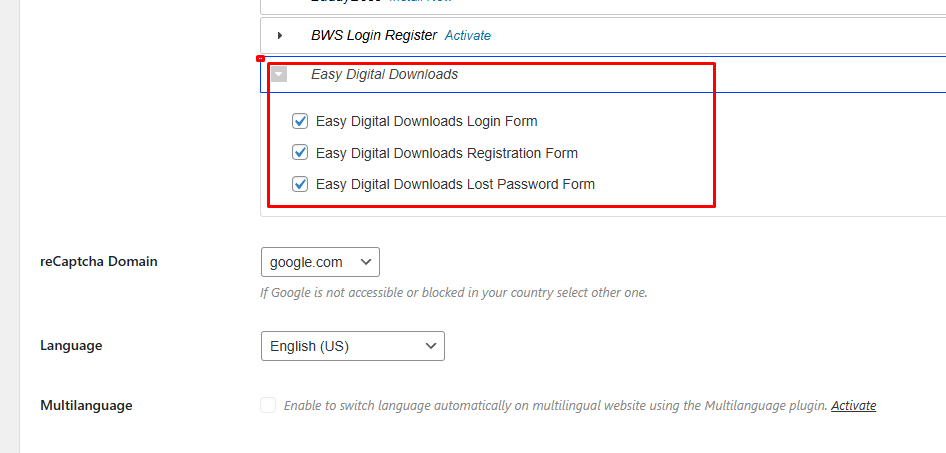
- Go to reCaptcha → Settings
- Scroll to the section with supported forms
- Locate Easy Digital Downloads options
- Enable the required checkboxes:
- Easy Digital Downloads Login Form
- Easy Digital Downloads Registration Form
- Easy Digital Downloads Lost Password Form
- Save changes
How reCAPTCHA Appears in EDD Forms
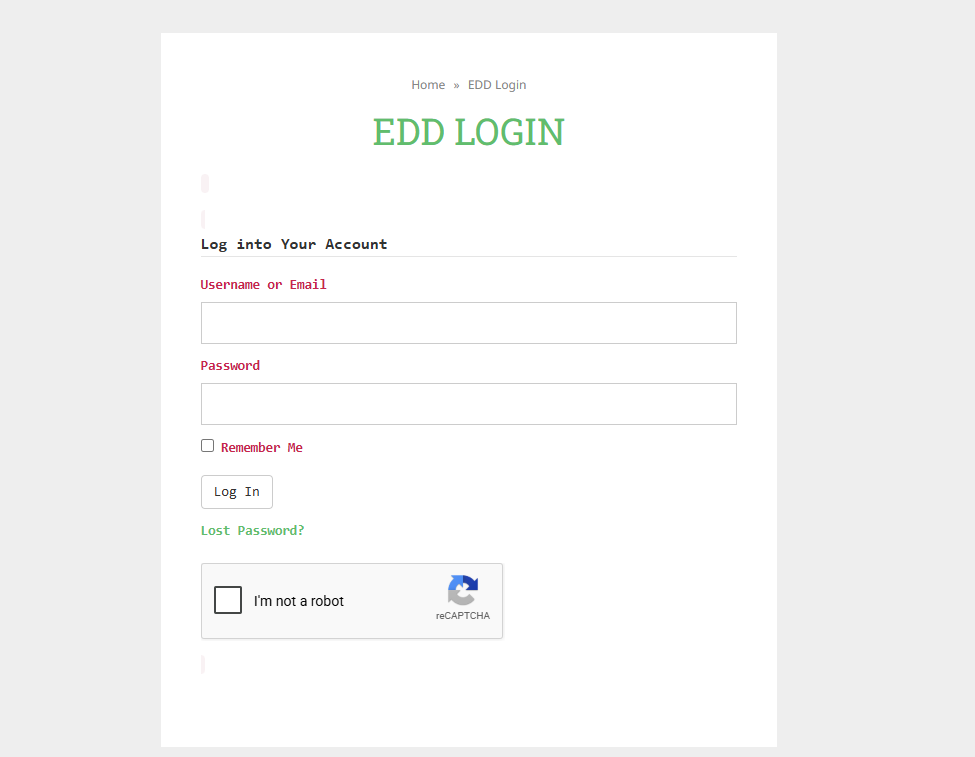
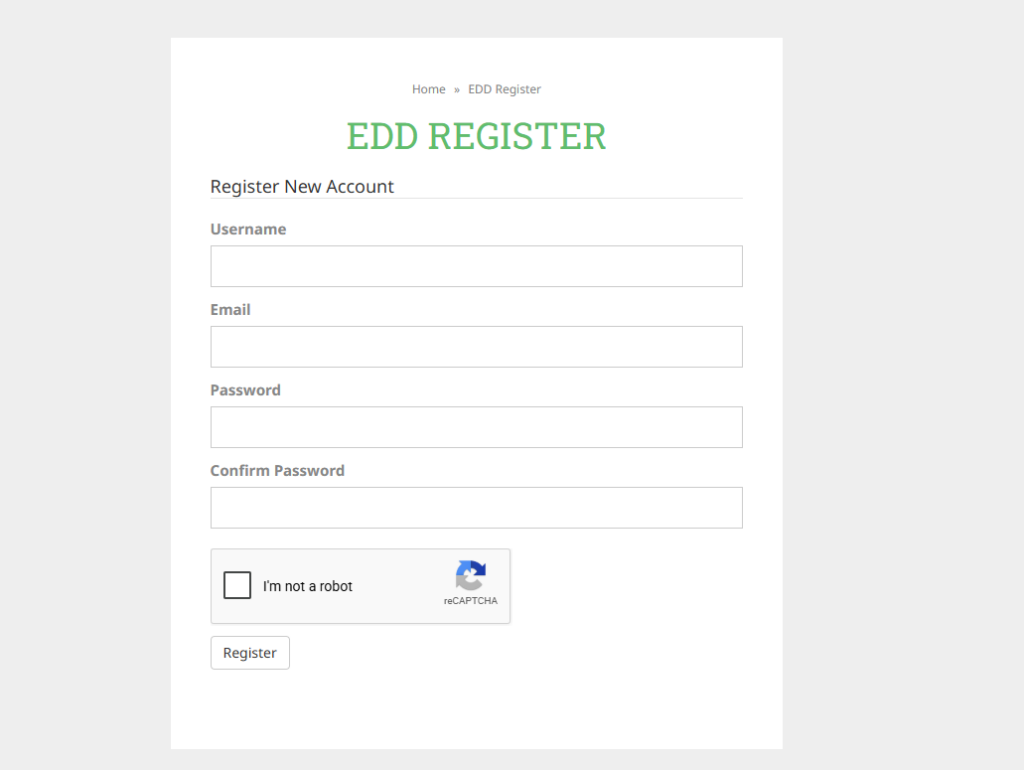
After enabling the feature, reCAPTCHA will automatically be added to the selected forms.
Login Form
Users must complete CAPTCHA verification before logging into their account.
Registration Form
New users must pass CAPTCHA validation before creating an account.
Why This Feature Matters
EDD forms are often targeted because they are publicly accessible. Adding reCAPTCHA helps:
- Block automated login attempts
- Prevent fake account registrations
- Protect password reset functionality
- Reduce spam and abuse
- Improve overall website security
This is especially important for websites that handle customer data and digital purchases.
Best Practices
To get the most out of this feature:
- Use reCAPTCHA v2 or v3 depending on your needs
- Combine CAPTCHA with strong password policies
- Regularly monitor login activity
- Keep all plugins updated
FAQ
Does this feature require Easy Digital Downloads Pro?
No. It works with the standard Easy Digital Downloads plugin.
Can I enable reCAPTCHA only for specific forms?
Yes. You can choose which forms to protect by enabling only the required checkboxes.
Will it affect user experience?
Minimal impact. reCAPTCHA is designed to be user-friendly while blocking bots.
Does it work with all reCAPTCHA versions?
Yes, depending on which version you configure in plugin settings.
Is coding required?
No. Everything is configured through the WordPress admin panel.
Does this feature require Easy Digital Downloads Pro?
Yes. It works with the standard Easy Digital Downloads plugin and Pro version.
Can I enable reCAPTCHA only for specific forms?
Yes. You can choose which forms to protect by enabling only the required checkboxes.
Will it affect user experience?
Minimal impact. reCAPTCHA is designed to be user-friendly while blocking bots.
Does it work with all reCAPTCHA versions?
Yes, depending on which version you configure in plugin settings.
Is coding required?
No. Everything is configured through the WordPress admin panel.
Conclusion
The new Easy Digital Downloads integration in the reCaptcha plugin makes it easy to secure your store’s most important user interactions. By adding CAPTCHA protection to login, registration, and password reset forms, you reduce spam, protect user accounts, and improve overall site security.
If you are running an EDD store, enabling this feature is a simple but essential step.


