

Understanding how often your content is downloaded or printed is important for evaluating its real value. With the latest update of the PDF & Print plugin, you can now see how many times a PDF or print version of a post has been generated – directly in WordPress.
This new feature adds clear and useful statistics without extra tools or third-party services.
What Is the “PDF/Print Generation Counter” Feature?
The PDF/Print generation counter shows how many times users have generated or downloaded the PDF or Print version of a post.
Once enabled, the plugin:
- Displays a counter next to the PDF / Print button on the front end
- Adds a PDF/Print Generation column in the WordPress admin area
- Works for posts and supported custom post types
This helps you quickly see which content is actually being used in PDF or print format.
How to Enable PDF & Print Generation Counter
To activate this feature, follow these steps:
- Go to PDF & Print → Settings
- Find the option Show count of PDF/Print generation
- Enable the option
- Save changes
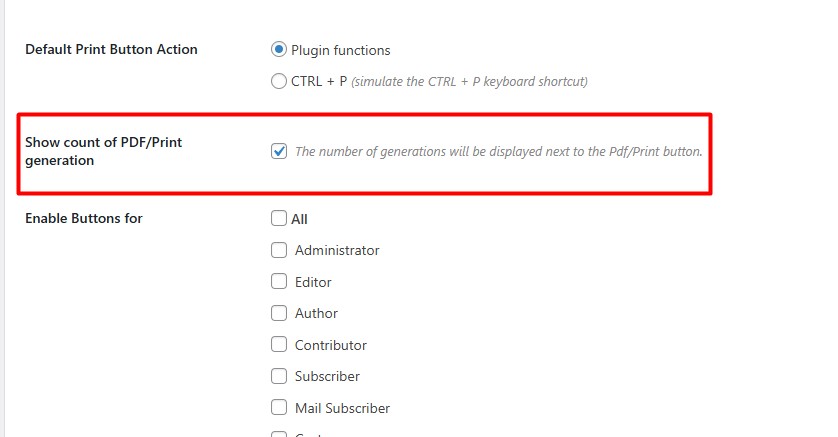
Once enabled, the counter starts working automatically.
PDF Download Counter on the Front End
After activation, the number of PDF or Print generations will appear next to the PDF/Print button on posts where PDF generation is enabled.
Each time a visitor:
- Generates a PDF
- Downloads the PDF
- Uses the Print option
…the counter increases.
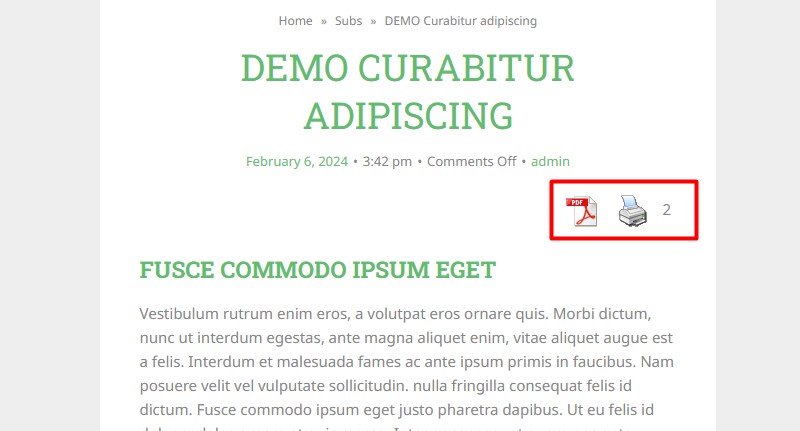
This allows visitors and site owners to instantly see how popular the downloadable version of the content is.
PDF/Print Generation Column in the Admin Area
The plugin also adds a new column called PDF/Print Generation in the WordPress admin panel.
You can find it on:
- Posts page
- Supported custom post type pages
Next to each post, you’ll see a number showing how many times its PDF or Print version has been generated.
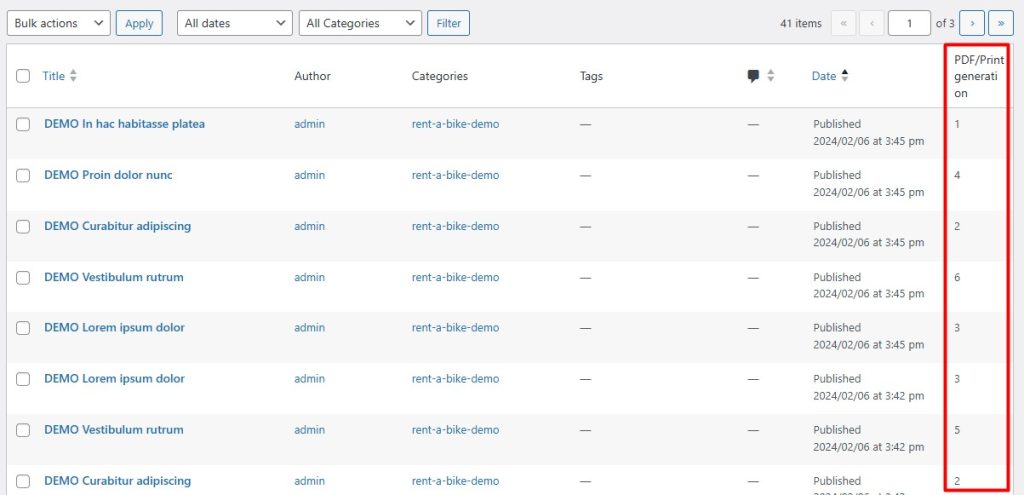
This makes it easy to:
- Compare posts by download activity
- Identify high-value content
- Track engagement without opening each post individually
Why This Feature Is Useful
The PDF/Print generation counter is especially helpful if you:
- Share guides, manuals, or documentation
- Offer printable materials
- Want to measure real user interest beyond page views
- Need simple internal analytics without external services
All data is displayed directly inside WordPress – no setup, no integrations.
FAQ – PDF & Print Generation Counter
How does the PDF/Print generation counter work?
The counter increases every time a visitor generates or downloads the PDF version of a post or uses the Print option. Each action is counted automatically by the plugin.
Does the counter work for custom post types?
Yes. The counter is displayed for posts and supported custom post types where PDF or Print generation is enabled.
Does this feature track unique users?
No. The counter shows the total number of PDF or Print generations, not unique visitors or sessions.
Will the counter affect site performance?
No. The feature is lightweight and works inside WordPress without external scripts or third-party analytics tools.
Can I reset the PDF/Print generation count?
No, the plugin does not include a built-in reset option. The counter reflects the total number of PDF or Print generations since the feature was enabled.
Where can I see the number of PDF downloads?
You can see the generation count:
1. In the PDF/Print Generation column on the Posts or Custom Post Types page in the WordPress admin area
2. Next to the PDF/Print button on the front end
Final Thoughts
The new PDF & Print generation counter adds practical insights into how your content is used. With clear numbers on both the front end and in the admin area, you can easily track PDF and Print activity and make better content decisions.
If you already use PDF & Print for downloadable content, this feature gives you extra value with zero extra effort.


