Modern websites often require more than just basic contact forms. In many cases, businesses need confirmation, consent, or approval directly from users – especially when dealing with service requests, agreements, or legal acknowledgments.
The Contact Form plugin by BestWebSoft now includes a new E-Signature (Electronic Signature) feature. This allows you to add a signature field directly to your contact form, making it easy to collect signed submissions without third-party tools or external services.
In this guide, you’ll learn how the e-signature field works, how to enable it, and how signed data is delivered via email.
What Is an E-Signature Field in a Contact Form?
An e-signature field allows users to draw their signature directly inside the form before submitting it. The signature is then attached to the form submission and sent to the site administrator.
- Service requests
- Consent forms
- Simple agreements
- Client confirmations
- Internal approvals
Unlike external signing platforms, this solution works entirely inside WordPress.
How to Enable the E-Signature Field
The e-signature option is managed directly from the form fields settings.
Step 1: Open Contact Form Fields Settings
- Go to Contact Form → Additional Settings.
- Scroll down to the Fields table.
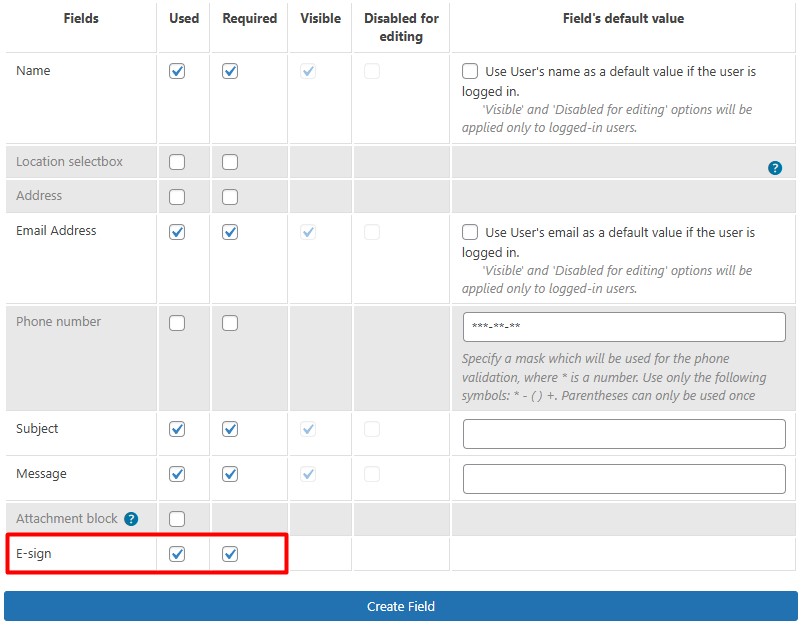
- Locate the E-Signature field.
Step 2: Configure the E-Signature Field
In the fields table, you’ll see two checkboxes:
- Used – enables the signature field in the form
- Required – makes the signature mandatory before submission
You can:
- Enable the signature as optional
- Or require it for legal or confirmation purposes

Once saved, the signature field will automatically appear in your contact form.
How the E-Signature Looks in the Contact Form
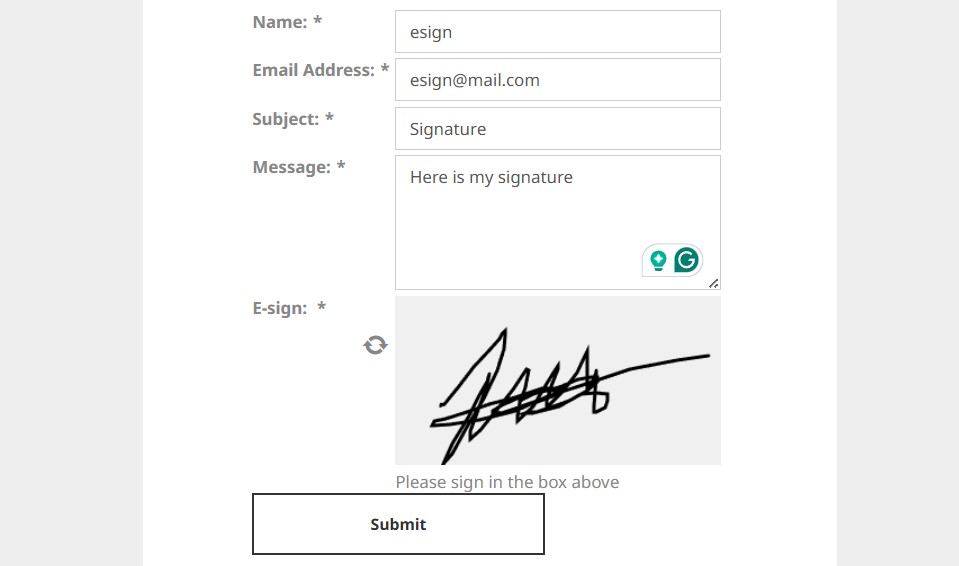
When users open the form on the frontend, they’ll see a signature area where they can draw their signature using a mouse, trackpad, or touchscreen.
This makes the process intuitive and accessible across devices.
What Happens After Form Submission?
Once the form is submitted:
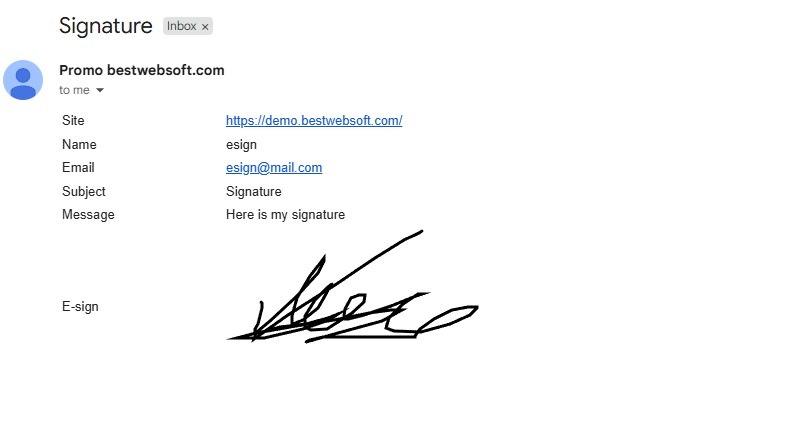
- The signature is saved as an image
- The form message is sent to the administrator
- The signature image is included in the email notification
This allows you to review and store signed submissions without logging into the dashboard.
Practical Use Cases for E-Signature Forms
Service Requests
Clients can confirm service terms before submitting a request.
Consent & Authorization Forms
Collect user consent for data processing, policies, or agreements.
Freelancers & Agencies
Approve estimates, scopes of work, or project confirmations.
Internal Business Forms
Use signatures for internal approvals or acknowledgments.
Benefits of Using Built-In E-Signature in WordPress
- No third-party signing services
- No monthly fees
- Works directly inside WordPress
- Simple setup via form fields
- Signature included in email notifications
- Compatible with existing Contact Form workflows
SEO & UX Advantages
- Improves form completion trust
- Reduces friction in approval processes
- Keeps users on your website
- Enhances the professionalism of contact forms
- No impact on page speed or indexing
FAQ
Is the e-signature legally binding?
The feature is designed for confirmations and agreements. Legal validity depends on your local laws and use case.
Can I make the signature required?
Yes. Enable the Required checkbox in the fields table.
Is the signature stored in the database?
The signature is included in the submission data and sent via email.
Does it work on mobile devices?
Yes. Users can draw signatures on touchscreens without issues.
Can I add multiple signature fields?
Currently, one signature field per form is supported.
Conclusion
The new E-Signature feature in the Contact Form plugin by BestWebSoft makes it easy to collect signed submissions directly on your WordPress site. With a simple checkbox-based setup and automatic email delivery, you can add an extra layer of trust and confirmation to your forms – without external services or complex integrations.
If your forms require approval, consent, or acknowledgment, adding an e-signature field is a smart and practical upgrade.